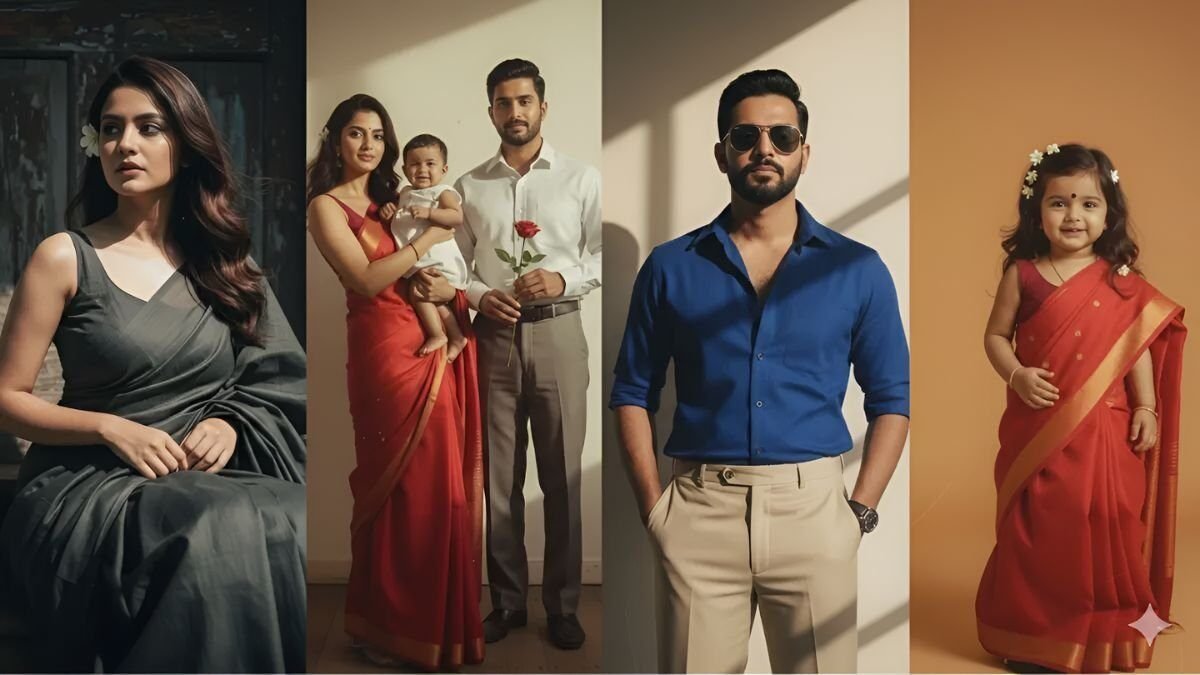
Gemini AI revolutionizes ordinary selfies into breathtaking 4K vintage portraits with exceptional color quality and professional-grade results. In today’s competitive social media landscape, standard photos simply don’t capture attention. However, distinctive and visually striking content creates genuine emotional connections with audiences.
Within seconds, Gemini AI transforms everyday snapshots into cinematic masterpieces with stunning 4K resolution. Whether you’re recreating iconic 80s Bollywood aesthetics or capturing that moody 90s atmosphere, this powerful tool delivers professional results through simple text commands.
What Makes Gemini AI Stand Apart?
Gemini AI delivers exceptionally realistic, professional-grade outcomes that surpass traditional photo editing applications. The platform uses straightforward text instructions to apply vintage cinematographic filters alongside natural-looking formats and visual effects.
Moreover, the tool proves perfect for residential settings, romantic couple photography, family portraits, and creative projects. Users can achieve stunning results without requiring advanced technical skills or expensive equipment.
For example, a simple command like “Transform this image to reflect 1980s Hindi cinema aesthetics, incorporating sepia color grading and distinctive film grain texture” produces immediate results matching that exact visual style. Therefore, Gemini AI democratizes professional-quality photo editing for everyone.
10 Expert AI Vintage Portrait Commands
Command 1: Traditional Temple Portrait
“Create a 1990s-style portrait featuring a woman elegantly wrapped in an ivory sari-blouse combination, hair styled in a traditional bun decorated with fresh jasmine blossoms positioned on one side, maintaining direct eye contact with the camera while displaying a serene expression, positioned near ornate decorations at a historic riverside temple. Achieve a contemplative, timeless atmosphere through gentle illumination and characteristic film grain texture. Preserve original facial features intact.”
Command 2: Weathered Doorway Scene
“Apply subtle gray-cement color grading to this portrait. Subject wearing traditional cotton sari, hair adorned with a single rose, positioned beside weathered wooden doorway. Wall shadows create authentic 1980s vintage atmosphere. Maintain distinctive facial characteristics while ensuring natural appearance.”
Command 3: Sepia Cinema Style
“Generate classic 1980s-inspired portrait. Subject adorned with vibrant red accessories, wearing fitted trousers, featuring flowing long hair, processed with sepia color treatment and dramatic shadow play—creating an enigmatic aesthetic reminiscent of 1970s cinematography. Preserve natural facial structure.”
Command 4: Family Studio Composition
“Recreate traditional family studio portrait composition. Father dressed in charcoal suit, cradling infant. Mother wearing elegant silk gown. Warm golden illumination emanating from cream-colored backdrop and filtered window light. Maintain realistic facial features.”
Command 5: Nostalgic Family Bonding
“Design nostalgic family scene. Mother in burgundy dress, bonding with infant while father in crisp white kurta holds fresh flowers. Baby displays joyful expression wearing ruffled dress. Incorporate period-appropriate styling, shadow work, and artistic elements throughout composition. Preserve authentic facial characteristics.”
Command 6: Romantic Couple Portrait
“Craft vintage romantic portrait of mature couple. Woman elegantly dressed in emerald sari with traditional gold jewelry and floral hair decorations, gentleman in sophisticated gray suit. Capture intimate moment with subjects gazing at each other. Apply aged sepia processing with textural elements to evoke nostalgic memories. Maintain original facial features.”
Command 7: Classical Girl Portrait
“Generate timeless, classical portrait. Young girl wearing pristine white dress, hair styled with crimson flowers and jasmine blossoms, featuring traditional small bindi, one hand positioned confidently on hip. Apply distinctive film grain and ethereal processing style. Ensure clear facial visibility.”
Command 8: Dramatic Shadow Play
“Create custom male portrait. Subject in cream-colored shirt and dark trousers. Incorporate dramatic plant shadow patterns on wall created by direct sunlight, positioned at diagonal angle for cinematic composition. Enhance with rich tonal values and film-like texture on facial features.”
Command 9: Traditional Turban Style
“Produce aged, textured portrait. Male subject wearing pristine white kurta with elaborate turban, female also adorned with turban styling. Both subjects decorated with fresh flowers. Traditional jewelry and turban designs should evoke authentic 1970s film aesthetics.”
Command 10: Rustic Book Reader
“Generate nostalgic portrait composition. Male subject seated on rustic wooden bench, wearing azure turban and tan-colored pants, holding vintage book. Natural green background with filtered sunlight streaming through tree branches. Apply warm vintage color temperature processing. Maintain original facial characteristics.”
Step-by-Step Guide to Creating Vintage Artwork with Gemini AI
Creating stunning vintage-style portraits with Gemini AI requires following a simple process that delivers professional results consistently.
- Account Access: Log into Gemini AI platform using your existing Google credentials
- Image Upload: Select a high-quality, well-lit selfie with clear facial details
- Prompt Application: Copy one of the provided commands above or craft your personalized instruction
- Processing: Your vintage-style portrait generates in stunning 4K high-definition quality
- Download and Distribution: Save your newly created cinematic photograph and share across social media platforms
Additionally, users can experiment with different lighting conditions and clothing styles to achieve varied vintage effects. Furthermore, combining multiple prompt elements creates unique artistic interpretations.
Final Reflections
Gemini AI transcends being merely a photo editing application; it functions as a temporal portal for your personal photographs. Users can effortlessly transform ordinary snapshots into vintage movie poster aesthetics, achieving classic visual appeal with single interactions.
This innovative experience deserves exploration by classic cinema enthusiasts and anyone seeking to create distinctive social media presence. Therefore, the platform opens new creative possibilities for photographers, content creators, and social media users alike.
Frequently Asked Questions
What makes Gemini AI better than other photo editing tools for vintage effects?
Gemini AI produces highly realistic, high-quality results through simple text prompts, allowing users to apply vintage film filters with naturalistic formats and effects. Additionally, it requires no technical expertise while delivering professional-grade outcomes perfect for various photography projects.
How long does it take to create a 4K vintage portrait using Gemini AI?
It takes just seconds for Gemini AI to transform a simple selfie into a cinematic portrait of 4K quality. Whether creating an 80s Bollywood poster look or that moody 90s aesthetic, the processing happens almost instantaneously.
Do I need special photography skills to use these vintage portrait prompts?
No special skills are required. Simply sign in with your Google account, upload a clear selfie, paste one of the provided prompts or create your own, and your vintage portrait will be ready in 4K HD with one click.
Can Gemini AI maintain original facial features while applying vintage effects?
Yes, all the provided prompts specifically include instructions to preserve original facial characteristics while applying vintage styling. This ensures the subject remains recognizable in the transformed portrait while achieving authentic vintage aesthetics.
Are there any limitations to the types of photos that work best with Gemini AI?
Gemini AI works best with high-quality, well-lit photos with clear facial details. However, the platform can enhance various lighting conditions and photo qualities, making it versatile for different input images and creative projects.

